14 display layers
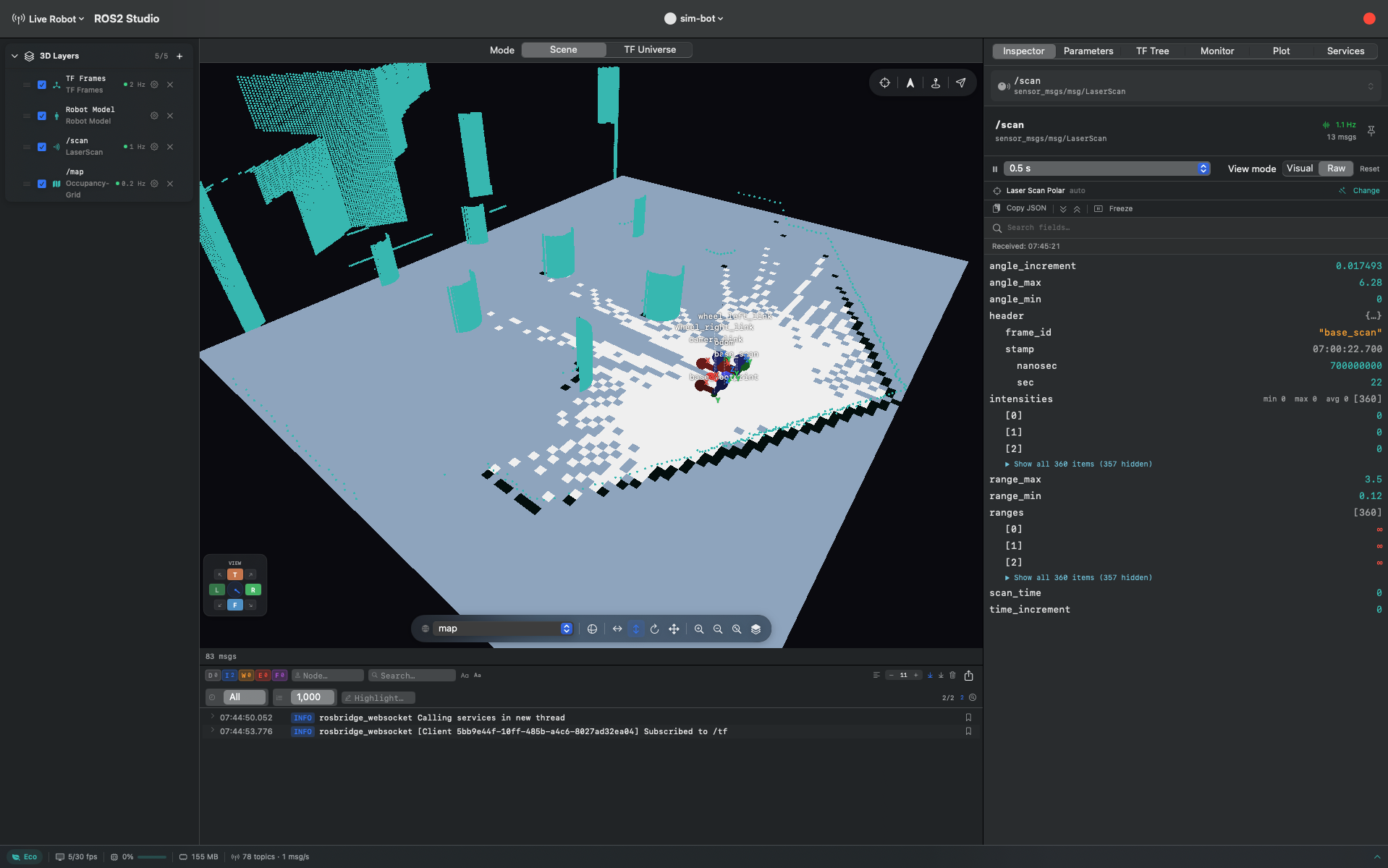
LaserScan, PointCloud2, OccupancyGrid, Octomap, Odometry, MarkerArray, Path, TF frames, robot model, maps and more — composited by a Metal 4 renderer.
Native macOS · ROS 2
RDSM is a native macOS cockpit for ROS 2 — a Metal-rendered 3D viewport, topic inspection, TF, and logs, talking to your robot over rosbridge. No ROS install on your Mac. No Electron.
Latest release · notarized by Apple · macOS 15+ ·
release notes
Prefer to build it yourself? The core is open source —
github.com/hjatupon/rdsm-community
What you get, free
Everything below ships in RDSM Community — open source under Apache 2.0, and complete enough to debug a robot with.
LaserScan, PointCloud2, OccupancyGrid, Octomap, Odometry, MarkerArray, Path, TF frames, robot model, maps and more — composited by a Metal 4 renderer.
Browse every topic by namespace, then read any message as an expandable JSON tree with search, freeze, and rate throttling.
See the frame hierarchy, publish rates, staleness, and per-edge transforms as your robot moves.
Loads URDF over /robot_description or from disk, resolving
package:// mesh paths — STL, OBJ, DAE.
Send String, Twist, TwistStamped or raw JSON; drop a Nav2 goal or 2D pose estimate by dragging on the floor plane; browse and call any ROS 2 service.
Severity filters, node and message search, auto-scroll, and a capped buffer that keeps long sessions responsive.
Editions
Both editions currently ship the same, proven feature set. Community is free and open source, downloaded here. Pro is the same app sold on the Mac App Store — where it’s listed as RDSM Pro — for teams that need a purchased licence, an invoice, and managed updates. The advanced tooling below is in development and will land in Pro as it’s finished.
| Capability | Open source Community | Paid Pro |
|---|---|---|
| Visualize | ||
| 3D viewport · 14 layers | Included | Included |
| Robot model (URDF + meshes) | Included | Included |
| TF tree — text & diagram | Included | Included |
| TF Universe — immersive 3D diagnostics | — | In development |
| Inspect | ||
| Topic browser | Included | Included |
| Raw / JSON message inspector | Included | Included |
| Purpose-built visualizations | — | In development |
| Time-series plotting | — | In development |
| /rosout log viewer | Included | Included |
| Command | ||
| Publish String / Twist / raw JSON | Included | Included |
| Saved message templates | — | In development |
| Nav2 goal & 2D pose estimate | Included | Included |
| Service browser & caller | Included | Included |
| Parameter editor, diff & profiles | — | In development |
| Record & replay | ||
| Record live topics to MCAP | — | In development |
| Rosbag playback & timeline | — | In development |
| Bookmarks & annotations | — | In development |
| Connect | ||
| rosbridge connection | 1 robot | 1 robot |
| Source code | Apache 2.0 | Closed |
Build from source
The Community edition is the whole app — 28 Swift packages, no private dependencies. It builds with stock Xcode.
# 1 — tooling
brew install xcodegen

# 2 — build the app
git clone https://github.com/hjatupon/rdsm-community.git
cd rdsm-community/app
xcodegen generate --spec project.yml
xcodebuild -project RDSMCommunity.xcodeproj \
           -scheme RDSMCommunity build

# 3 — simulated robot, then connect to
#     ws://localhost:9090
cd ../testing/sim-bot
docker compose up -d